How to Take Headshot: Essential Tips for Stunning Professional Photos
Introduction to Headshots
A professional headshot is more than just a photo—it’s a powerful tool for building your personal brand in today’s digital-first world. Whether you’re updating your LinkedIn profile, launching a new business, or refreshing a company website, your headshot is often the first impression you make. A great professional headshot communicates confidence, approachability, and professionalism, helping you stand out in a crowded field and connect with potential clients, employers, or collaborators. In this guide, we’ll show you how to take your own professional headshots, covering everything from preparation and posing to editing and sharing. With a few tips and the right approach, you can create a headshot that truly represents your best self and supports your professional goals.
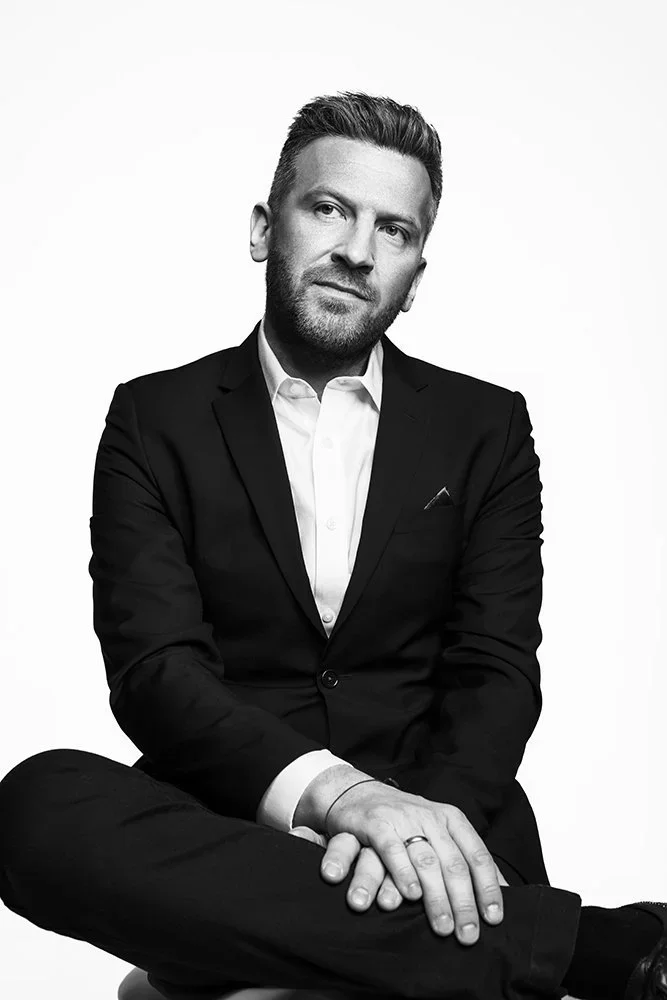
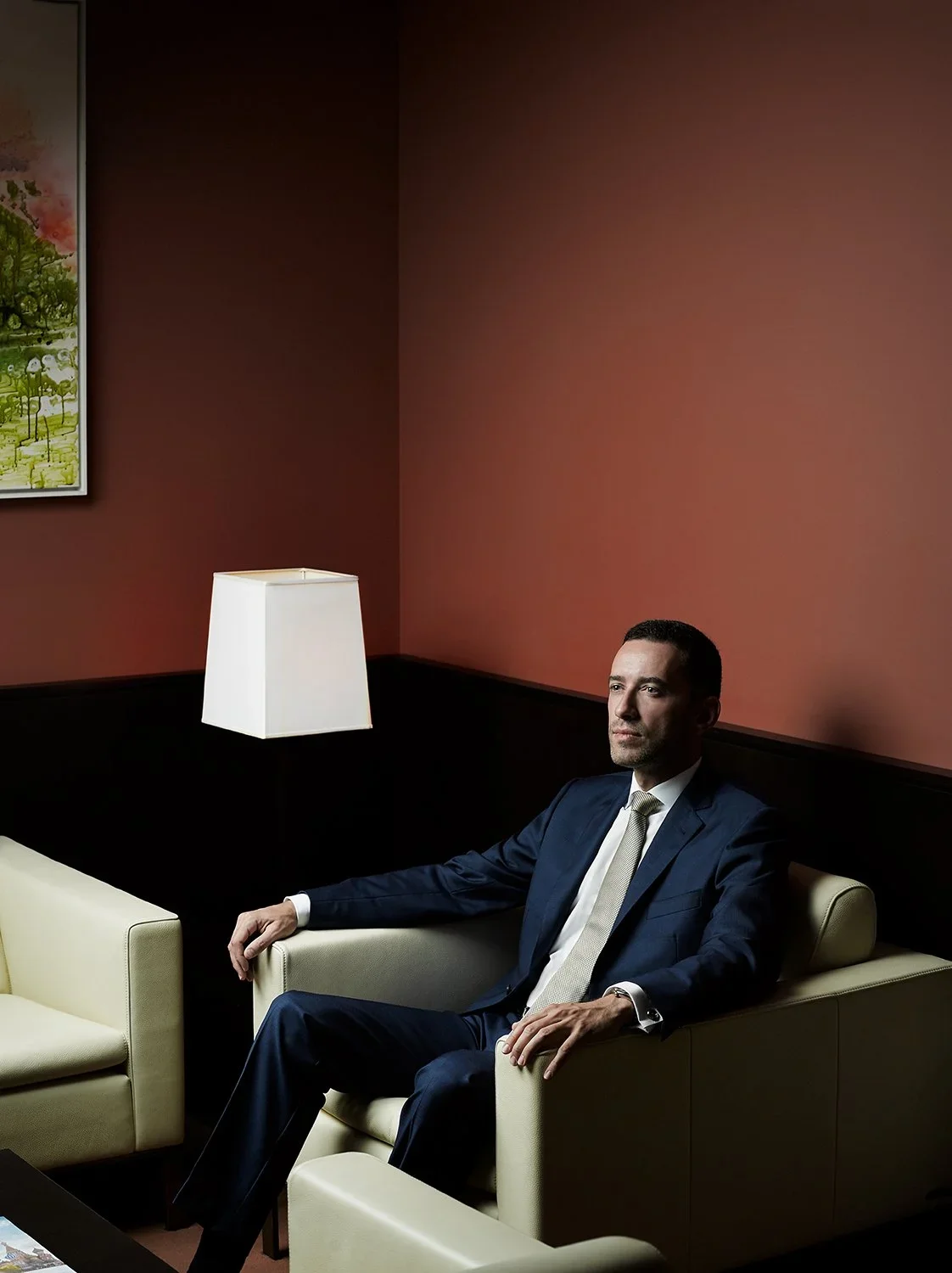
How to Capture Corporate, Executive & Remote Headshots in NYC
A headshot is a professional photograph of a person’s face, typically used for business profiles, websites, and press materials. If you’re searching for how to take a headshot—whether for yourself, your team, or your company—you’re in the right place. This guide covers both professional and DIY headshot approaches, making it relevant for business professionals, teams, and individuals who want to look their best online.
When considering how to take a headshot, you’ll need to decide whether to hire a great photographer or take your own headshot. A great photographer brings skill, experience, and the ability to capture your best angles and authentic expressions, resulting in the best headshots that show personality, engagement, trust, and likability. While you can take your own headshot, a professional ensures quality, consistency, and a polished look that’s hard to achieve on your own. Investing in a professional headshot is a commitment to your personal brand and professional image.
Why does this matter? Professional headshots are important for making a good first impression online. In today’s digital world, your headshot is often the first thing people see on LinkedIn, your company website, or in press materials. A strong, consistent headshot supports your personal brand, builds trust, and helps you stand out in a crowded marketplace. Taking several photos during your session gives you more options and increases the chances of capturing a good headshot.
This blog post is a straight process walkthrough: planning, photo day, and delivery—so your headshot photo looks intentional, not accidental. We’ll also provide a step-by-step DIY checklist for those who need a quick, effective headshot on a budget. Make sure the photo's background is simple and free of distractions so the focus stays on your face. Hiring a professional photographer ensures high-quality images, expert editing, and can save you time and reduce stress. The general public can often tell when a headshot is professional versus amateur, which can impact first impressions.
Our Times Square studio runs professional corporate headshots NYC, executive portraits, and remote headshot sessions for teams that need the process to work as well as the photo—and the photo needs to work across every channel. We build a shot list before we touch a professional camera. We lock the location. We assign call times that respect your calendar. We set camera settings for consistency, and we run a quick photo test so the light and background match the plan. We guide people in front of the camera so they feel comfortable. And we deliver selects within realistic windows—with true same day headshots NYC when the news cycle demands it.
The format depends on your team: in-studio headshot sessions in Times Square for maximum control, on location headshots NYC at your office or venue, or remote headshots via a guided app workflow for distributed teams. This is a process guide, not a lecture on posing. If you want to scope a specific photo session date, email hello@match-production.com with timing, headcount, and any photo deadline.
Quick answers: how we actually run headshot photography days in NYC
A headshot session starts long before anyone stands in front of the camera, because a headshot photo day is mostly logistics. We plan around your constraints: how many people, where they are, and when you need final files. For a 30-person small business team, that might mean an 8:30 am to 4:30 pm window with 10-minute slots and a shared call sheet so everyone knows exactly when to show up. For a single executive portrait, it might mean a focused 45-minute photo session with wardrobe choices, live photo review, and a clear final photo selection.
Our three main formats cover most situations:
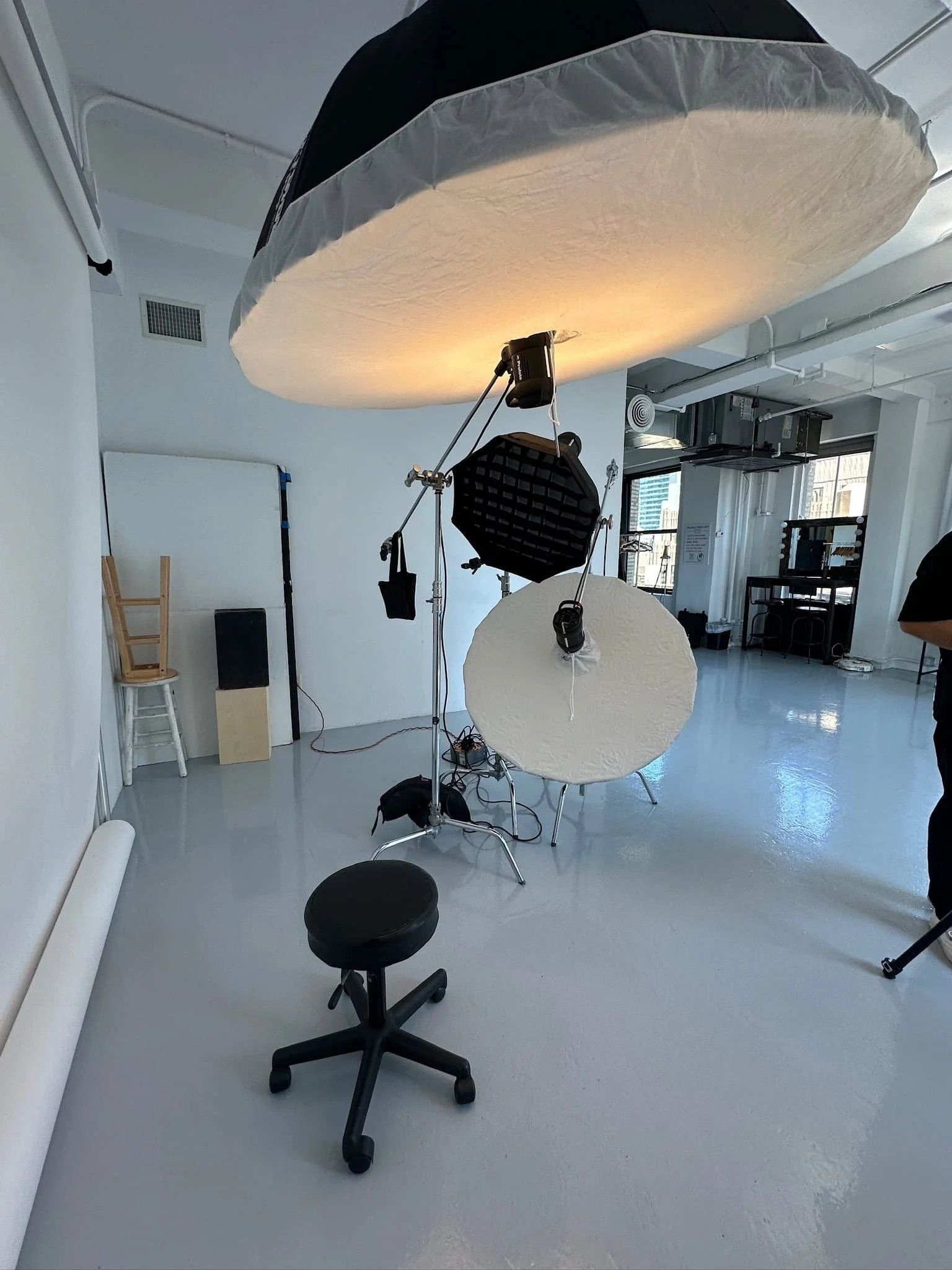
Studio headshot sessions in Times Square for a controlled background and controlled artificial light, using professional studio lighting setups for consistent, flattering results.
On location headshot sessions across Manhattan and the boroughs for teams that need the studio brought to them.
Remote headshot sessions for distributed teams who still need a consistent professional headshot.
To prevent color distortion in your headshots, avoid mixing natural light with artificial lighting during your session.
Each format has its logic, and we help you choose based on headcount, timeline, and where the image or photo will live: your LinkedIn profile, your website, a careers page, a press kit, or investor materials. For the best headshot results, we recommend choosing a simple, neutral background to keep the focus on the subject’s face.
Planning your corporate headshots NYC: scope, schedule, shot list
Defining Scope
A typical inquiry lands in our inbox from an HR lead or comms director: “We need updated team headshots and executive portraits for LinkedIn, the website, and an upcoming press day. Can you handle 45 people in two weeks?” That is where planning starts.
We define scope first. How many people? Are they in one Midtown office near Bryant Park or spread across three floors in FiDi? Do you need tight LinkedIn-style headshot crops, wider leadership portraits that show more body, or both? Is there a PR deadline driving the timeline? These questions shape everything from crew size to equipment choices, to camera choices, to background options, to the order of the day.
Scheduling and Call Sheets
From there, we build a practical schedule. A sample block might look like this: 30 people, one headshot photographer, 10-minute slots, 9:00 am to 1:30 pm with buffer for stragglers and wardrobe checks. We send a shared call sheet so your team knows their slot and prep instructions. No one should wonder when to show up or what to wear. Good headshot photography feels calm.
Visual Standards and Approval Process
We also define visual standards in advance. Background style might be clean studio gray, a white wall, a branded office environment, or textured NYC architecture. We align on retouching level, wardrobe guidelines including a suit jacket, and whether the company wants consistent crops and aspect ratios across the headshot set. For personal branding photography and personal brand consistency, these details matter more than most people expect.
Finally, we confirm who signs off on the look. We send a simple one-page pre-production brief and a quick photo reference to avoid last-minute surprises. By the time we show up on shoot day, everyone knows the plan, the background direction, and what “done” looks like.
Studio headshots in Times Square: controlled light source, consistent results
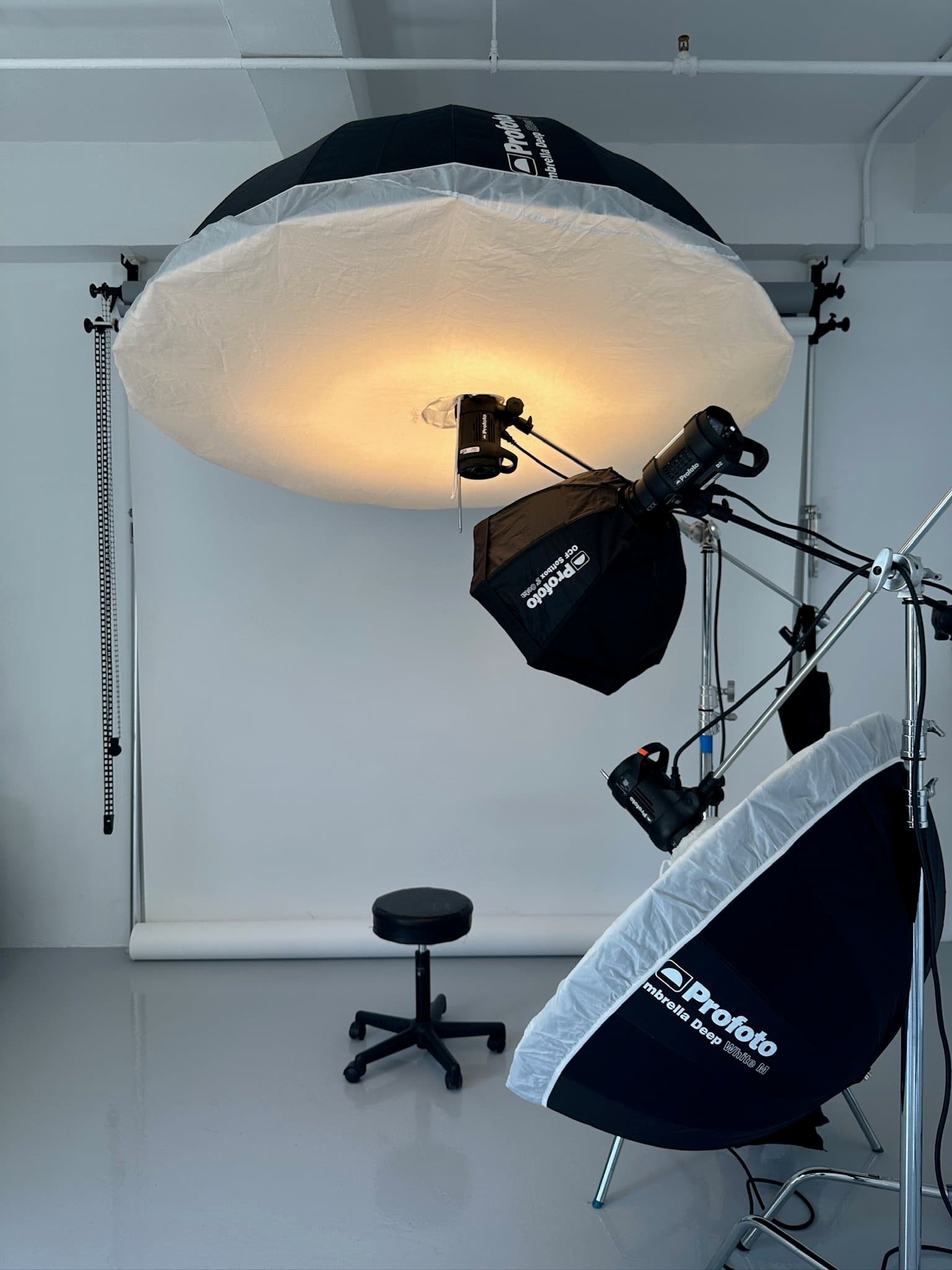
Our Times Square studio sits in the middle of Manhattan with easy subway access for visiting executives and local teams. We control everything inside, including the photo background and the light: background options, lighting ratios, sound, and temperature. Our studio lighting setup uses artificial lighting—such as soft, diffused LED or fluorescent lights—for precise control over the light source, ensuring consistent results regardless of the time of day or weather. Techniques like Rembrandt lighting and careful positioning of artificial lights help us achieve flattering light that enhances facial features and creates professional, natural-looking headshots. We avoid mixing natural light with artificial light to prevent color distortion in headshots. Professional photographers understand how to use these lighting techniques effectively to create flattering images, which is often challenging for individuals taking their own headshots. No weather risk. No ambient light changing mid-session. It is a controlled light source environment, with a backup light source on standby and repeatable camera settings locked.
The studio advantage is repeatable quality. When you run tight back-to-back headshot sessions, each person gets the same light recipe, the same background, and the same framing. That consistency matters when 20 headshots need to sit next to each other on a leadership page.
A typical individual executive portrait session runs 45 to 60 minutes. We shoot 2 to 3 wardrobe changes, mix standard headshot frames with slightly wider leadership portraits (and other portraits if the brief calls for it), and review images live on a tethered screen. The executive sees options in real time and leaves knowing we captured a strong professional headshot and a usable professional photo for press, web, and internal photo needs. The ideal lighting for headshots is soft and even, which we achieve in the studio by positioning subjects near large light sources and using diffused artificial lighting.
For team days in the studio, we stagger arrival times so no one waits in a crowded lobby. Each person gets a quick hair colour and lint check, then 8 to 10 minutes in front of the camera. After the shoot, we create a shared review gallery for final photo selection. The whole headshot process moves faster than most people expect, and the results are higher quality than any DIY professional headshot attempt or amateur photo taken with a smart phone front-facing camera.
On location headshots NYC: bringing the studio to your office
Large teams and busy offices often prefer on location headshots NYC. No travel for your staff. Easy to pair with all-hands days or leadership offsites. Minimal disruption to the workday.
We start with a pre-production walkthrough. Someone from your office sends us simple photo snapshots of candidate spaces: a conference room with good window light, a quiet corridor, a lobby with interesting textures, or a clean plain wall. We check window direction, ceiling height, and background options. We also assess natural light quality: is the natural light soft, does the natural light stay consistent, and can we shape the natural light with flags or diffusion? If natural light is insufficient, we bring in artificial lighting—using soft, diffused sources like LED or fluorescent lights—to achieve a flattering light for headshots. It's important to avoid mixing natural light with artificial light to prevent color distortion in the final images. Then we decide whether to use a portable backdrop or work with the real office background.
Our crew arrives 60 to 90 minutes before the first subject. We set up strobes and modifiers, test the light with a volunteer, and confirm backup gear is ready. We choose camera position and camera height so the headshot framing stays consistent, then we run a quick photo check. For a 60-person fintech team near Union Square, we ran two shooting stations with one photographer per station, 6 to 7 minutes per person, and wrapped in under five hours including breaks.
Logistics across Manhattan and the boroughs require coordination. We plan travel windows, freight elevator timing, and security check-in. We work with office managers to avoid blocking reception or busy hallways. When the environment cooperates, on location headshots can show more context than a studio session: the real light, the actual space, and the texture of your workplace background.
One detail that matters more than people expect: natural light from windows. Direct sun can create harsh shadows and uneven skin tone fast. We position subjects to face indirect window light for natural, soft lighting, which produces the most flattering headshot results. Alternatively, we use artificial lighting positioned to mimic flattering light styles, such as Rembrandt lighting, to enhance facial features. We avoid high contrast because it reads as accidental in a corporate headshot photo. The goal is a professional shot that looks intentional, not a quick photo grabbed between meetings.
Remote headshots: guided sessions without herding everyone into one room
Remote headshots solve a specific problem: your team is distributed, travel is expensive, or you cannot block time for an on-site crew. We use a dedicated app workflow and live guidance so people do not figure it out alone with a selfie camera in portrait mode.
We design a visual standard first. Background type, crop, framing, and expression guidelines. Whether you have 5 people or 500, the final images should look like one cohesive team online. That consistency is harder to achieve than it sounds, and it is where remote headshot photography fails without proper production.
Each participant receives a time window or self-schedule link. They get simple wardrobe and setup instructions: where to position the camera, how to find good lighting, how to build a clean, simple, neutral background to keep the focus on the subject, and what to wear (including avoiding a t shirt or distracting patterns). We teach a simple natural light setup when possible, because natural light is flattering on most faces. If natural light is not available, we show them how to use a lamp as a secondary light source. We recommend taking multiple photos with different expressions to increase the chances of capturing a great headshot. After the session, we suggest using photo editing apps like Facetune or VSCO for light editing—such as color correction and removing blemishes—while avoiding heavy filters that alter skin texture or make the image look unnatural. We either run a live guided session via video or use a structured capture flow that we later curate and retouch.
Remote headshots work well for distributed leadership teams and remote photo needs, fast-growing startups, or last-minute profile picture needs before a press announcement. Remote sessions can start around USD 100 per person for teams, depending on volume and retouching level. The result is a professional headshot that supports your personal brand, not an awkward webcam grab with overhead lights and a cluttered background.
Same day headshots NYC and rush executive portraits: when the news cycle moves faster than your calendar
Same day headshots NYC means we shoot and deliver a small set of finished images within the same business day. Sometimes the timeline is even tighter.
Typical scenarios: a PR lead gets a 10 am call about a 6 pm media deadline. A new executive appointment needs press-ready images before the announcement goes live. A founder secures a last-minute panel slot and needs a strong portrait for event marketing.
Here is a concrete example from our crew. An executive books a 9:30 am Times Square headshot session. We shoot until 10:15, covering two looks with quick wardrobe adjustments. The image goes to our retoucher on priority. By 4 pm, we deliver 2 to 3 finished files for same-day press use. Total time from shutter to inbox: six hours (and yes, that is a real photo turnaround).
What makes rush work: pre-cleared retouching style, efficient background choice, and limiting selections so we can finish on time without cutting quality. Real same day work may carry a rush fee and requires quick decisions from the client. We are transparent about what is realistic in a 4 to 8 hour window. If you need a perfect headshot by end of business, call early.
Camera Settings and Equipment for Professional Headshots
Getting a sharp, high-quality professional headshot starts with the right equipment and camera settings. If you have access to a professional camera, use it for the best results, but don’t worry if you’re working with a smartphone—modern phones with a good camera lens can deliver impressive results for a diy professional headshot. Before you start, make sure your camera lens is clean to avoid any smudges or blurriness. Set your camera or phone to its standard photo mode; avoid using portrait mode or filters that might distort your features or blur the background unnaturally. For the steadiest shot, use a tripod or ask a friend or family member to take the photo for you—this helps prevent camera shake and ensures your headshot is crisp. Adjust your camera settings to allow plenty of light in, and double-check your focus before snapping each photo. With the right setup, you’ll capture a sharp image that looks polished and professional.
Headshot Composition and Expression: Making Every Shot Count
The secret to a great professional headshot lies in thoughtful composition and authentic expression. Start by experimenting with different poses and angles—sometimes a slight turn of the shoulders or a gentle tilt of the head can make a huge difference. Try positioning yourself slightly off-center in the frame, following the rule of thirds for a more dynamic look. When it comes to expression, aim for a natural smile that feels genuine, rather than a forced smile that can look stiff. Take multiple photos with subtle changes in your pose and expression; this gives you plenty of options to choose from and increases your chances of capturing that perfect shot. Review your images carefully and select the one that best reflects your personality and professionalism. Remember, a relaxed, confident demeanor always shines through in a professional headshot.
Background and Props: Setting the Scene for Success
Your choice of background and props can elevate your professional headshot from ordinary to outstanding. Opt for a simple background, such as a white wall or a soft, neutral color, to keep the focus on your face. A light blue shirt can add a touch of color without overwhelming the image, while still maintaining a professional vibe. Avoid cluttered or busy backgrounds that might distract from your expression or create visual noise in the photo. If you want to add a bit of personality, consider a subtle prop—like a notebook or a pen—but keep it minimal so it doesn’t steal attention from you. The goal is to create a clean, polished look that highlights your features and supports your professional image.
What we handle so your team does not have to: wardrobe choices, posing, and consistency
Most people do not love being photographed. Some freeze. Others worry their headshot will look stiff. Our job is to make the headshot session painless while keeping the personal brand and company brand consistent. For a polished appearance, trim or shave facial hair in advance, and keep hair styled neatly and away from your face. Use light makeup to reduce shine before the shoot. Keep jewelry simple and minimal to avoid distractions in your headshot.
A few tips (and yes, they are actually top tips) that help people stay relaxed: prep matters more than posing. We send simple wardrobe notes in advance: solids photograph better than busy patterns. Choose colors that complement your skin tone and hair color for headshots. Dark colors are perceived as more formal and authoritative, while light colors are seen as friendly and approachable. Avoid overly dressy clothes like formal attire—comfort is key, as discomfort will show in your expressions. A light blue shirt or neutral tones work for most skin tone situations. Avoid large logos. Steam your clothes the night before. If you wear glasses, clean them and consider lenses without heavy anti-reflective coating to reduce glare. If you wear makeup, keep it natural. If you have long hair, keep flyaways controlled. If you are between outfits, choose the option that feels like your personal brand, not a costume.
On set, we coach micro-adjustments. Head straight or slightly tilted. Chin forward and down to avoid double chins. Shoulders angled to create shape. Hands relaxed. We offer options: a natural smile for friendly roles (yes, teeth showing if that fits), or a more neutral look for leadership portraits—no forced smile required, and it still looks like you in real life. We show a few frames so people feel comfortable before we capture the final image and lock the final photo pick.
We maintain consistency across large groups and multiple shoot days. Same background. Same lighting recipe. Locked camera settings and camera lens position. Framing guides so new headshot sessions match previous ones. The goal is a sharp image that looks intentional, not a random photo taken at different angles with a wide angle lens.
Our retouching is realistic. We remove temporary blemishes, reduce shine, manage flyaways, and balance skin tone. We do not transform faces or erase facial features. The headshot should look like you on your best day, not a stranger. That approach separates a professional headshot from an over-processed corporate image that nobody trusts.
From capture to delivery: selection, photo editing, and usage
After the shoot, we back up files immediately and run an initial cull. Our team removes duplicates, blinks, and obvious misses. Then we create proof galleries for individuals or admins.
Selection works simply. Each person or the team lead picks favorites via an online gallery. We share guidance on choosing the right headshot for a LinkedIn profile versus internal tools versus external PR. The best photos for social media are not always the strongest images for a press kit.
Our photo editing pipeline ensures consistency. We use photo editing apps and software, such as Facetune or VSCO, for light editing like color correction and blemish removal, while avoiding heavy filters that alter skin texture. A professional photographer can provide expert editing services to enhance the final image, making it look polished and professional. Color and exposure alignment across the headshot set. Background cleanup. Light skin work. We deliver multiple crops: square for LinkedIn, horizontal for websites, vertical if needed for print or speaking events. We also deliver naming that supports careers pages and internal systems.
Realistic timing looks like this:
Files arrive as high-res JPEGs for print and optimized web versions for faster loading on careers pages and press rooms. Everything is labeled clearly with names and roles. No hunting through folders named “IMG_4582.” Your team gets clean photo files with clean names, and each image is labeled clearly.
Saving and Sharing Your Headshot: Best Practices
Once you’ve captured and edited your professional headshot, it’s important to save and share it thoughtfully. Save your photo in multiple formats, such as JPEG and PNG, to ensure compatibility with different platforms and uses. Consider backing up your headshot to a cloud storage service so you can access it whenever you need it, whether you’re updating your LinkedIn profile or sending it to a potential client. When sharing your headshot, use the same image across all your professional profiles and social media accounts to reinforce your personal brand and create a consistent online presence. If you have a professional website or online portfolio, feature your headshot there as well to showcase your professionalism and make a strong first impression. With these best practices, your professional headshot will be ready to support your career wherever opportunity strikes.
How to choose whether you need studio, on location, or remote headshots
Here’s a quick comparison to help you decide which headshot format fits your needs:
While DIY options are available, hiring a great photographer ensures professional results—thanks to their experience and skill in capturing the best angles and expressions, which can be difficult to achieve on your own.
If you are unsure, send your headcount, rough timeline, and locations to . We will give you a concrete recommendation, not a sales pitch—and we will tell you which format wins for your photo and headshot goals.
Working with Match Production: simple next steps
We are a New York City headshot and portrait studio that handles corporate headshots NYC, executive portraits, on location headshots, and remote sessions. We work with PR and comms teams, HR leads, founders, and executives who care about brand consistency and personal brand alignment—because a headshot is a personal brand asset, and the personal brand shows up in every photo. We do not run a volume mill. We run a professional production run by a photographer team that knows how to deliver a consistent headshot.
The next move is simple:
Email us your headcount, timing, and preferred format
We respond with a proposed plan and estimate
Once approved, we lock in dates and share prep materials for your team
Send scope and timing to or visit our booking page. A few lines are enough to start. We will handle the rest so your team gets a business headshot that actually represents them, not a traditional headshot from 2012 that everyone quietly hates.
DIY corner: a clean plan for a quick headshot (when you must)
If your budget is truly zero and you need a headshot today, you can attempt a DIY headshot (yes, you can take your own headshot). Be sure to take several photos during your session—capturing different poses and expressions, including photos smiling—to give yourself options to choose from for your final image. Focus on framing your upper body (head and shoulders) and use a simple, neutral photo's background to keep the attention on you. If you want a higher quality result, we recommend either a professional headshot session or at least setting up a proper light source and background.
DIY Headshot Checklist:
Set up your camera or phone at eye level for the best angle.
Use a simple, neutral background—avoid clutter or distractions in the photo's background.
Wear solid, professional clothing; avoid busy patterns and logos.
Style your hair neatly and ensure your clothes are wrinkle-free.
Keep makeup and accessories simple and minimal.
Practice smiling in front of a mirror to find your best expression for headshots. Capture several photos smiling and with different expressions to convey likability and approachability.
Frame the shot to include your upper body (head and shoulders).
Take multiple photos to have several options to choose from.
Use photo editing apps like Facetune or VSCO for light, natural edits—avoid over-editing for a professional finish.
Tips:
Wear solid colors, keep your hair neat, and use minimal jewelry. Edit lightly with photo editing apps to maintain a natural, professional look.
DIY Headshot Setup
How to Take a Headshot: DIY Step-by-Step Checklist
Clean your camera lens – Ensure your camera or smartphone lens is clean for a sharp image.
Use natural light – Face a large window for soft, even lighting. Avoid direct sunlight to prevent harsh shadows.
Choose a simple background – Use a plain wall or uncluttered space that complements your image.
Position the camera at eye level – Use a tripod or have someone else take the photo to avoid distortion and the 'selfie arm' effect.
Wear solid, professional clothing – Choose solid colors that complement your skin tone and avoid busy patterns, logos, or wrinkles.
Style your hair and keep makeup natural – Neat hair and simple makeup look best.
Practice natural expressions – Think of something that makes you happy for a genuine smile.
Take multiple shots – Capture at least 20-50 photos with slight variations in expression and pose.
Check posture and pose – Keep your back straight, shoulders back, and chin slightly forward and down for a confident look.
Edit lightly – Crop, adjust brightness and contrast, and correct color. Avoid heavy filters or skin blurring.
Lighting Tips
Use natural light whenever possible for a flattering, even look.
Avoid direct sunlight, which can create harsh shadows.
If natural light is unavailable, use a lamp as an artificial lighting source and diffuse it with a white sheet or curtain. Avoid mixing natural light with artificial light to prevent color distortion in your photos.
Position yourself so the light source is in front of you, not behind.
Editing and Final Touches
Use basic editing tools or photo editing apps like Facetune or VSCO for light editing—focus on color correction and removing minor blemishes.
Avoid heavy filters or excessive skin smoothing—keep your appearance natural and avoid altering skin texture.
Use software like Canva to cut out backgrounds if needed for a clean look.
Review all shots and select the one that best represents your professional image.